Friday, December 07, 2007

Collaring in OAM

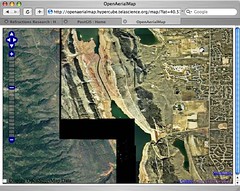
Collaring can pre-exist in images that have been masked prior to delivery, or can be generated by the process of re-projection, as the spare pixels in the target system get filled in with "no data" values.

Openaerialmap of Fort Collins

Sean uploaded some data from his home town of Fort Collins, and the OAM process to reproject it into the global OAM scheme (lat/lon?) collared it, which shows up at the edges of the data.

There are some GDAL tricks to make the collars transparent, but if there's some blank "no data" areas in the source imagery, it is hard to avoid it. OSSIM has some more advanced mosaicking capabilities that might fit the OAM processing needs better than GDAL.

7 comments:

crschmidt said...

The tools that we need to resolve this particular collaring are available in GDAL, in http://svn.osgeo.org/gdal/trunk/gdal/apps/nearblack.cpp . The problem is that the 'black' here really isn't black: it's just near black, a common result when working with imagery that's converted from lossily-compressed data.

The goal with the Fort Collins data was to get it done quickly: I'm currently nearblacking the data, and after it's done, I'll be dropping the new tiles in place and clearing the cache.

The bigger problem is not with uncompressed geotiffs, which at least can be created without these near black areas -- but instead with *compressed* images, which make more sense to use for many reasons: The source data for http://openaerialmap.org/map/?lat=48.0655630965&lon=-115.675834385&zoom=10 are all find, but saving the files using ossim's img2rr as JPEG compressed images introduces serious compression artifacts that I'm not sure how to deal with yet. Got any suggestions for those?

Paul Ramsey said...

My guess is that a "collar clipper" that nibbles away at almost-blank things from the outside inwards is the "fix". It must be a pretty common mosaicking problem, I'm surprised there's not a tool already available with it.

crschmidt said...

That's what nearblack does, from GDAL. However, (as far as I know) there's no way to do that with compression: the compression algorithm will ignore your nibbling away when you save the file, because it will reencode it however it thinks is best.

Your post made it sound like you had some experience with this problem in the past -- was I confused? Currently with OAM, we're waiting on GDAL1.5 to ship, after which we can start using bigtiff -- and instead of many little images (the ft collins imagery is 16, for example) it'll just be one image. For the Montana data, this will make a Very Big Difference, which I'm looking forward to. However, it still only mitigates the problem: if you go with jpeg compression, you get compression artifacts, and as far as I know, there's no way to fix them.

Lossless encoding would be a solution -- either via MrSID or JPEG2000 -- but there are no decent open source implementations of either. (The former for obvious reasons, the latter less obvious.) I wish that someone could tell me how to do lossless JP2 encoding in GeoTIFF -- that would rock -- but as far as I know, no such algorithm has yet been built.

Paul Ramsey said...

If you mosaic together the high- and low-res imagery before re-compressing, the artifact problem should be permanently gone.

We kept the imagery raw, but uncompressed, for our big "pseudo mosaic" of BC ortho-photos, hence avoiding your problem of having the artifacts re-appear when you re-compress.

Making a permanent mosaic is more complex, but seems to be the way the "big boys" do it. The various feathering and so on you see in the imagery boundaries of Google and Microsoft imagery is the evidence of that.

crschmidt said...

Well, yes, but that's not really an option. :)

It is technically possible to do what you say, but it's not something that I'm willing to do at this point: there's simply too much CPU time involved in that to allow the 'close to immediate' processing time that people are interested in. Also, I'm not really sure how it solves the problem: *somewhere* you have to keep the uncompressed data, so that you can build your worldwide mosaic. We aren't Google: we're currently working on no more than a dozen terabytes of data at most. As a result of not being Google, there are some things you give up: picture perfect mosaics are among them. Collaring will happen. Other negative effects will happen. If you can't deal with that -- well, don't use OAM :)

We're working to mitigate the effects. I have interest in storing an uncompressed nodata mask along with the data: this would allow the imagery itself to be compressed, while the (small) mask could be uncompresed, meaning that we could save space but still get rid of the nodata. I'm not sure yet if this can work: I'm still new at this raster stuff, so it may be a long time before we see something like that.

In the end, I expect that OAM will be much more flexible with the options you have for what imagery you use. As we get there, we will see more cases where if one particular mosaic isn't what you want, well, just turn it off, and the problem for that case is solved. Nodata typically is only in existence *outside* the image: If you are looking outside the image anyway, then don't look at it :) It's not a perfect solution, but OAM isn't a perfect solution anyway. It's just a hack that a lot of people get excited about :)

Paul Ramsey said...

A "nodata mask" could be compressed with-out using a lossy algorithm, simple run-length-encoding would get great compression ratios, so that's a fine approach indeed.

You can in fact store the a "merged mosaic" with compression, since you will have filled the complete raster space with data (from various sources), right up to the edges, so your artifacts-at-data-boundaries problem will be gone. You'll end up with 50% more data, of course: raw data, mosaicked data, tiled data.

crschmidt said...

Right, but at the point where you're storing raw data, you don't have to store the mosaic at all: you just build the mosaic on the fly when you build your tiles. There may be a point at which this doesn't scale, but we haven't found it yet. Until we bump into that, we will instead be running into scaling problems in different ways :)

About Me

My Photo
Victoria, British Columbia, Canada

Followers

Blog Archive

Labels